Kubota Diagmaster is diagnostic software developed by Kubota Corporation for use with their electronic control systems in various Kubota equipment, including tractors, excavators, skid steers, wheel loaders, engines, generators, and utility vehicles.
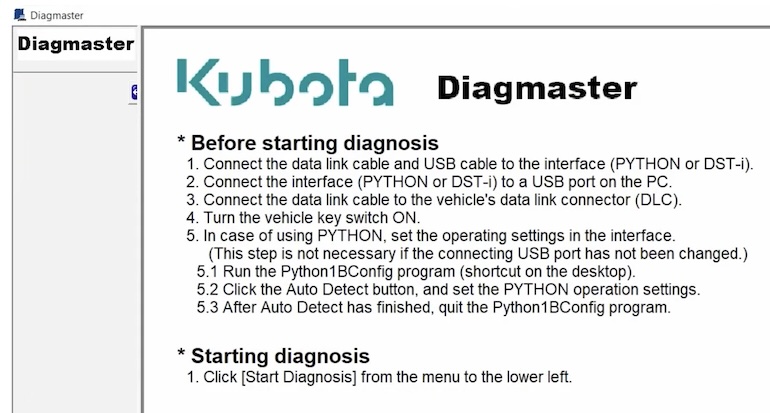
It provides technicians and service personnel with advanced diagnostic capabilities, allowing them to read and clear diagnostic trouble / error codes (DTCs), perform system tests, programming/configuring ECU, view sensor data in real-time, and perform other diagnostic functions to troubleshoot and repair Kubota machinery more effectively.
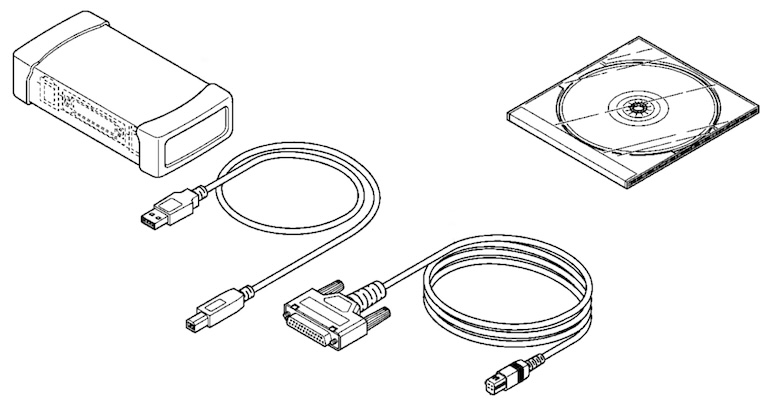
Kubota Diagmaster typically requires a compatible diagnostic interface device to connect to the equipment’s electronic control modules for communication and diagnosis.
How Kubota Diagmaster Work?
Kubota Diagmaster works by providing a user-friendly interface for technicians and service personnel to communicate with the electronic control modules (ECMs) / engine control unit (ECU) in Kubota equipment.
Here’s how it typically works:
- Connection: The Diagmaster software is installed on a Windows-based computer or laptop, and a compatible diagnostic interface device is connected to the Kubota equipment’s diagnostic port. This interface device acts as a bridge between the computer and the ECU / ECM in the equipment.
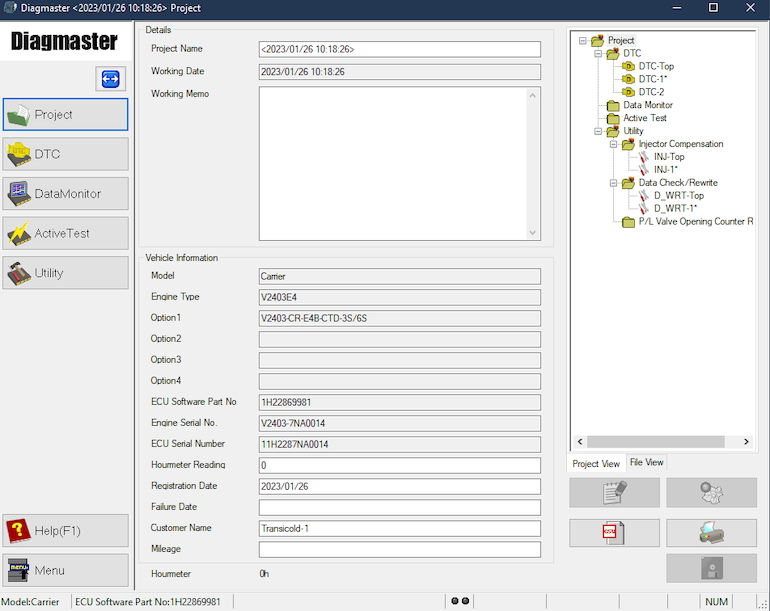
- Identification: Diagmaster communicates with the ECM to identify the specific model and system of the Kubota equipment being diagnosed. It retrieves information such as the equipment’s serial number, firmware version, and installed components.
- Diagnostic Functions: The software allows users to perform various diagnostic functions, including:
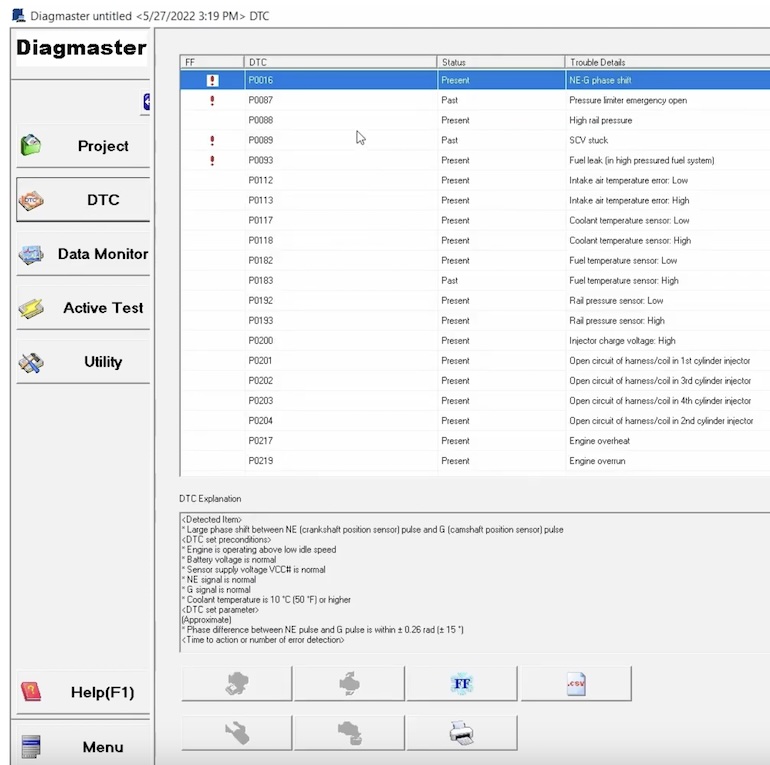
- Reading and clearing diagnostic trouble codes (DTCs): Diagmaster can retrieve fault codes stored in the ECMs and provide descriptions of the issues detected. Technicians can then clear the codes after addressing the underlying problems.
- Viewing live data: Diagmaster enables real-time monitoring of sensor data, such as engine speed, temperature, pressure, and other parameters. This helps technicians diagnose issues and verify the performance of components.
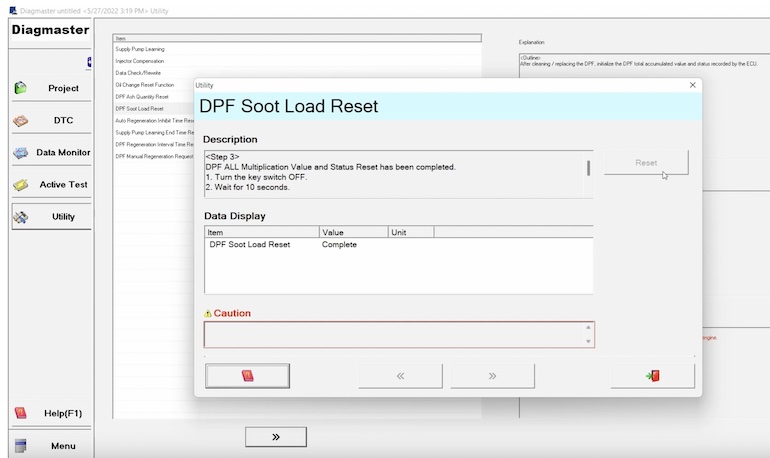
- Running system tests: The software may offer the capability to perform system tests and actuator tests to evaluate the functionality of specific systems or components.
- Programming and configuration: In some cases, Diagmaster allows users to update ECM firmware, calibrate sensors, and configure settings to optimize equipment performance.
- Troubleshooting and Repair: Based on the diagnostic information provided by Diagmaster, technicians can diagnose problems more accurately and efficiently. They can then proceed with the necessary repairs or maintenance procedures to address the identified issues.
Overall, Kubota Diagmaster streamlines the diagnostic process for Kubota equipment, helping technicians diagnose and resolve issues quickly to minimize downtime and keep the equipment operating at peak performance.
Is Kubota Diagmaster Suitable for DIY
Kubota Diagmaster is primarily designed for professional technicians and service personnel who are trained in equipment diagnostics and repair. While some DIY enthusiasts may have access to Kubota Diagmaster and use it for basic diagnostics, it’s important to note that the software is geared towards advanced diagnostic functions and may require technical expertise to interpret diagnostic data accurately and perform repairs effectively.
Note: Access to Diagmaster diagnostic software is limited to Authorized Kubota Dealers
For DIY users who are unfamiliar with diagnostic procedures or lack experience in troubleshooting heavy equipment issues, it’s recommended to consult with authorized Kubota dealerships or experienced technicians.
They can provide guidance, assistance, and ensure that repairs are carried out safely and effectively.
Takeuchi / Kubota Diagmaster PC Requirements
To run Takeuchi / Kubota Diagmaster diagnostic software on your PC, you’ll need to ensure that your system meets the following requirements:
| CPU | 1GHz or more recommended |
|---|---|
| OS | Windows 7 (32bit / 64bit versions); Windows 8/8.1 (32bit / 64bit versions); Windows 10 (32bit / 64bit versions) |
| Memory | 2 GB or more recommended |
| Storage | 20GB or more recommended |
| Display | 1024 x 768 pixels, 256 colors or more recommended |
| Video Card | Integrated graphics card with DirectX 9.0c support or higher |
| USB port | USB 1.1 / 2.0 at least 1 port |
| Internet Connection | Required for software activation and updates |
It’s essential to ensure that your PC meets or exceeds these requirements to ensure smooth operation of the Takeuchi / Kubota Diagmaster software and proper communication with diagnostic equipment.
Additionally, always check for any specific requirements or recommendations provided by the software manufacturer for the best performance and compatibility.
Kubota Diagmaster Software FAQ
Kubota Diagmaster is designed to work with a wide range of Kubota equipment, including tractors, excavators, loaders, mowers, and utility vehicles.
However, compatibility may vary depending on the specific model and year of the equipment. It’s essential to verify compatibility before using the software.
- Can Kubota Diagmaster be used for programming ECM / ECU?
- Yes, Kubota Diagmaster may offer programming capabilities for ECM / ECU in certain Kubota equipment models. This allows users to update firmware, calibrate sensors, and configure settings to optimize equipment performance. However, programming functions may be restricted to authorized personnel.
- Where can I get Kubota Diagmaster?
- Kubota Diagmaster software and compatible diagnostic interface devices are typically available through authorized Kubota dealerships or authorized distributors. It’s essential to obtain genuine software and hardware to ensure compatibility and reliability. Access to Diagmaster diagnostic software is limited to Authorized Kubota Dealers
- Is training available for using Kubota Diagmaster?
- Kubota may offer training programs or resources for technicians and service personnel on how to use Diagmaster effectively. These training sessions may cover topics such as software navigation, diagnostic procedures, and troubleshooting techniques.
- Can Kubota Diagmaster reset error codes?
- Yes, Kubota Diagmaster can read and clear diagnostic trouble codes (DTCs) stored in the ECM / ECU of Kubota equipment. Technicians can use the software to diagnose issues, clear error codes after resolving problems, and reset the equipment’s status to normal operation.
- Is technical support available for Kubota Diagmaster users?
- Kubota may provide technical support services for Diagmaster users, including assistance with software installation, troubleshooting software/hardware issues, and answering technical questions related to diagnostic procedures and functions. Contacting authorized Kubota support channels is recommended for assistance.
- Does Diagmaster work on Windows and Mac operating systems?
- Kubota Diagmaster software is primarily designed for Windows-based computers. While it may be possible to run it on a Mac using virtualization software or compatibility layers, official support may be limited. It’s recommended to check with the software provider for specific system requirements.
- Can Kubota Diagmaster be used wirelessly or does it require a wired connection?
- Kubota Diagmaster typically requires a wired connection between the diagnostic interface device and the Kubota equipment’s diagnostic port. While some diagnostic interfaces may support wireless communication, Kubota Diagmaster may not have built-in support for wireless connectivity.
- Does Kubota Diagmaster support multiple languages?
- Kubota Diagmaster may support multiple languages to accommodate users in different regions. The availability of languages may depend on the software version and configuration. Users can typically select their preferred language within the software settings.
- Can Kubota Diagmaster perform advanced diagnostic functions beyond reading and clearing DTCs?
- Yes, Kubota Diagmaster offers advanced diagnostic functions beyond basic DTC reading and clearing. These functions may include performing actuation tests, viewing historical data, graphing sensor values, and accessing specialized diagnostic procedures for specific systems/components.
- Is Kubota Diagmaster compatible with older Kubota equipment models?
- Compatibility of Kubota Diagmaster with older equipment models may vary depending on the software version and the availability of diagnostic protocols for older ECU / ECM. While the software is designed to support a wide range of Kubota equipment, some older models may have limited functionality or require additional adapters.
- What brands does Kubota Diagmaster support?
- Kubota Diagmaster supports various brands of heavy equipment, including Kubota, Takeuchi, and HINO machines. The diagnostic tool is designed to work with these specific brands, offering comprehensive diagnostic capabilities for troubleshooting and maintenance purposes.
Kubota Diagmaster is primarily intended for on-site diagnostics performed by technicians directly connected to the equipment. While it may be possible to integrate diagnostic data with telematics systems for remote monitoring, Kubota Diagmaster itself is not typically used for remote diagnostics.
How much does Kubota Diagmaster cost?
The price of Kubota Diagmaster software varies depending on the specific package and features included. Here are some examples of Kubota Diagmaster prices from the provided sources:
– Kubota / Takeuchi Diagmaster Diagnostic Software Latest 2022 originally priced at $1,790.00, it is currently available for $899.00, offering full online installation and activation services. This software communicates with multiple vehicle ECUs and provides features like trouble code clearing, data recording, and extensive data monitoring.
– Kubota / Takeuchi Diagmaster Diagnostic Software 2022 available for $799.00, this software provides comprehensive diagnostics for Kubota and Takeuchi models, including features like trouble code clearing, data recording, and active tests. It supports multiple languages and offers online installation and activation services.
These prices reflect the range of costs associated with Kubota Diagmaster software, with variations based on the specific version, features, and services included in each package.
I’m an old guy who retired to the country 10 years ago. I had no prior experience with a tractor. Now there is a fairly new (380 hours, vintage 2015 or so) Kubota BX23S here. My problem with it is stalling on the hills. Not always, but lately within 10 minutes of climbing or going down hill. It always restarts easily. In looking for help, much to my suprise, it turns out some bigger/newer models have ODB II. There is no “window” of that for me. But is there a dangling conector somewhere I can tap into?
The Kubota BX23S does have electronic engine controls, but it does not use a standard automotive OBD-II diagnostic system. Kubota uses its own diagnostic interface and service software on these tractors, so you won’t find a 16-pin OBD-II port under the dash like you would in a car. Many BX23S tractors have a service/diagnostic connector in the wiring harness, but:
It’s intended for Kubota’s dealer diagnostic tool. It’s typically a small 2-, 4-, or 6-pin connector (depending on production date and engine). It’s usually tucked under the hood near the engine harness or behind the instrument panel, often capped and not connected to anything.
Unfortunately, there isn’t a simple adapter that lets you plug in a generic OBD-II scanner.
Your stalling sounds more like a fuel issue. The fact that it: starts easily every time; stalls primarily on hills; often after 5–10 minutes of operation – makes me think of a fuel delivery problem rather than an ECU fault.
The most common causes are:
– Partially restricted fuel filter (very common)
– Debris in the fuel tank that slides over the pickup on slopes
– Blocked tank vent creating a vacuum in the tank
– Air leak in the fuel line before the injection pump
– Low fuel level allowing the pickup to uncover on steeper grades
A few easy checks
1) Try running with the fuel cap loosened (safely, just as a test). If the problem disappears, the tank vent may be plugged.
2) Inspect or replace the fuel filter if it’s due.
3) Check the fuel bowl (if equipped) for water or contamination.
4) If it only happens with the tank below half full, fill it completely and see if the symptom changes.
Since the engine restarts immediately, ask yourself: does it lose power gradually before dying (like it’s running out of fuel)? Or does it shut off instantly, as if someone turned the key off?
A gradual loss of power points strongly toward fuel starvation. An instant shutdown suggests an electrical issue, such as the fuel shutoff solenoid, ignition switch, or a safety switch.